The short answer
- What do you get? One self-contained web page. In our run, one request gave a single HTML file in 3 minutes 22 seconds.
- Do the store buttons work? Not at first. In our run all four buttons pointed to "#" and the reply told us to swap in real store addresses. After one message with the two links, all four buttons pointed to them.
- Can I get a second language? We asked for a Japanese version and kept the English one. The same result then held two files, the second with lang="ja", and the store links carried over.
- What must I check? The page invented a 4.9 rating, 12.4k ratings, a user quote and a Strava, Garmin and Apple Health import for an imaginary app. Replace or delete every one of them.
What an app landing page is for
An app landing page has one job: get a visitor to tap a store button. Everything above the button is there to make that tap feel safe. A headline says what the app does, a phone screen shows it, a few selling points answer why, and a quote says someone else used it.
In uooki you describe the app the way you would to a friend: its name, what it does for the person using it, and what the page should contain. The page is built as one web page you can read in the canvas, change in the chat, and download or share from there.
The honest limit is that this is a page about your app, not the app. uooki does not build the app itself, and a page built from a sentence knows only that sentence. The sections below stick to what we ran and read ourselves.
What the real run did
We ran it on 2026-11-19 with one request for a running-log app called Stride Log. This is what happened, not a promise about every app:
One request, one page
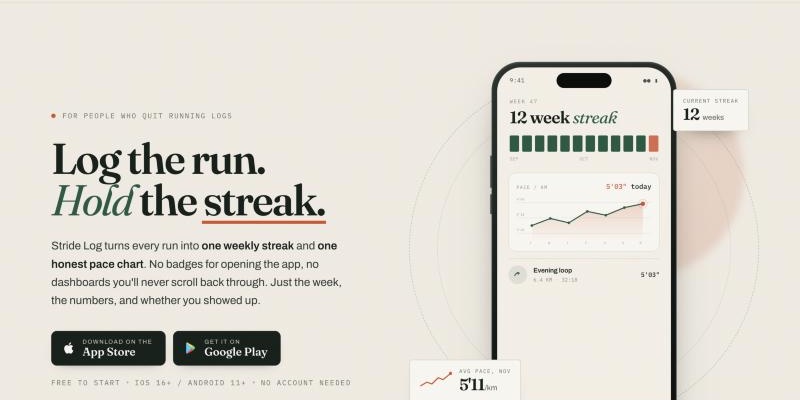
We asked for a headline, a phone screenshot area, three selling points, a testimonial area and two store buttons. We got one index.html with all of them, a sticky header with a "Get the app" button, a footer, and the two store buttons shown twice, once at the top and once at the bottom. It took 3 minutes 22 seconds.
The phone screen is drawn, not generated as a picture
The phone and its screen are inline SVG written into the page: a 12-week streak bar, a pace chart and one run in the list. We found no garbled text and no made-up brand logo in it. The store badges are drawn the same way, so they look like store buttons but are not the stores' official artwork.
The buttons were not real links at first
All four store buttons had the address "#", so a click went nowhere. The reply said so in one line: swap in your real App Store and Google Play addresses before launch. That is a reminder, not a finished page.
One message made them real
We wrote: "Swap in my real store links: App Store button goes to … and Google Play button goes to …". It took 11 seconds. All four buttons now pointed to the two addresses we gave. The four small footer links, such as Privacy and Support, still pointed to "#".
It made up facts about an app it knows nothing about
The first screen showed "4.9, App Store, 12.4k ratings", "2.4M runs logged" and "Strava, Garmin, Health import". The quote section had a named runner in a named city with a distance for the year, and the line under the buttons said "Free to start · iOS 16+ / Android 11+". We never said any of that. We would remove or replace all of it before the page goes anywhere.
The first screen of the page we got
Below is the top of the English page from the run, as it looks in a browser. The phone screen is drawn inside the page. The headline, the two store buttons and the line under them are as generated; the rating row under the phone is made up.
What we checked, and what is still yours
We read the page files the run produced. This is what we found:
| The part of the page | What we found | Still yours to do |
|---|---|---|
| Store buttons | Four buttons, all "#" at first; all four became the links we gave after one message | Say your two store addresses in your first request, then click each button once |
| Footer links | Privacy, Import and export, Support and Press kit stayed "#" | Give each a real address, or ask for them to be removed |
| Phone screen | Inline SVG, no garbled text or made-up logo found | Say you will swap in your real screenshots; we did not test that step |
| Rating, counts, quote | Invented for an imaginary app | Replace with real ones or delete |
| Feature claims such as an import from other apps | Invented; we never mentioned them | Remove anything your app does not do |
| Second language | A second file, lang="ja", store links reused | Have a native reader check the text |
Based on one real run with two follow-up messages on 2026-11-19.
How to get a page you can launch
Five things make the first page closer to what you can publish:
- Name the app and say what it does for one person. A name and one sentence about the user. The headline and the three selling points are written from that sentence.
- Put your two store addresses in the request. We only added them in a second message and it worked. If you have them already, say so up front.
- Tell it which facts to leave out. Say "no ratings, no counts, no quotes, no features I did not list" if you have none yet. We did not test whether that removes them, so read the page either way.
- Ask for the language you need in the same chat. Ask for another language as a second page and keep the first. In our run that gave a second file with the right lang value.
- Click every button before you share the page. The four footer links stayed "#". A button that goes nowhere is the one thing a visitor notices.
What this is not
It is not an app builder. It makes the page that promotes an app, and it does not make the app, and it cannot put your app in the stores.
It does not collect anything. We did not test a sign-up form or a waiting list, and the page has no form to collect email addresses. It does not count visits, run A/B tests or give you a custom domain, so treat the link it gives you as a place to send people from your own channels.
And it is not a fact source. The page invented numbers and features, and it made the phone screen look real. Check every claim against your app before a visitor reads it.
Run it yourself in uookiMake a one-page landing page for a fitness app called Stride Log. It's a running log app that turns each run into a weekly streak and a simple pace chart. Include a headline, a phone screenshot area, three selling points, a testimonial area, and two store buttons (App Store and Google Play).
Frequently asked
Can I use my own App Store and Google Play links?
Yes. In our run the buttons first pointed to "#". After one message with the two addresses, all four store buttons pointed to them. Click each one before you share the page.
Does it make a page in other languages?
We asked for a Japanese page and kept the English one. We got a second file with lang="ja" and the same store links. We tested only English and Japanese, so check the text of any other language.
Will it use my real app screenshots?
In our run the phone screen was drawn into the page and we did not swap in a real screenshot. We did not test that step, so we do not promise how it works.
Are the ratings and quotes on the page real?
No. In our run the page invented a rating, rating counts, a named user quote and a list of integrations for an imaginary app. Replace them with real ones or delete them.
Can the page collect emails or a waiting list?
We did not test any form, and we have not seen the page collect data. It has store buttons, which are plain links. Do not plan around a sign-up form.
Does it build the app?
No. It builds the web page that promotes an app. The app itself is yours, and you publish it to the stores yourself.
Can I get a custom domain or visit statistics?
We did not find either in our run, so we do not offer them here. You get a page you can download and share.
How long does a page take?
Our first page took 3 minutes 22 seconds, the link swap 11 seconds and the Japanese page 2 minutes 6 seconds. Time depends on the request, and these runs were on a local test setup, so yours may differ.