The short answer
- Want the key points of a web page? Paste the link into the message and say how you want it, such as five bullet points and a one-line takeaway. The answer appears in the chat. In our run it took 32 seconds and showed 2 credits.
- Want a document instead of a chat reply? Ask for it. Say you want a Word document and you get one. It takes longer than a chat reply: our Word run took about three minutes and showed 16 credits.
- What if the link does not work? When the page did not exist, the reply said the site returned a 404 and that there was nothing to summarize. It did not invent a summary.
- Can it read any page? No. It cannot open an address on your own computer or a private network, such as localhost. We did not test pages that need a login, PDFs, or video links, so we do not promise them.
What a website summarizer should and should not do
Most people who search for a website summarizer have one page open and not enough time. They want the main points, the numbers and the catch, in less time than the page would take to read. That is a narrow job, and the useful question is what the tool does when it cannot do it: a page that has gone, a page that is private, a page that is very long.
In uooki there is no separate tool to open. You write the request as you would to a colleague: the link, and what you want out of it. A page-reading step runs behind the scenes, and you can see it in the chat as a line such as "Read uooki.com" with the size of what it read. Then the reply is written from that page.
What the real runs did
We ran it on 2026-11-16 against our own pages, one public encyclopedia article and some addresses that should fail. This is what happened, not a promise about every page:
A public page, summarized in the chat
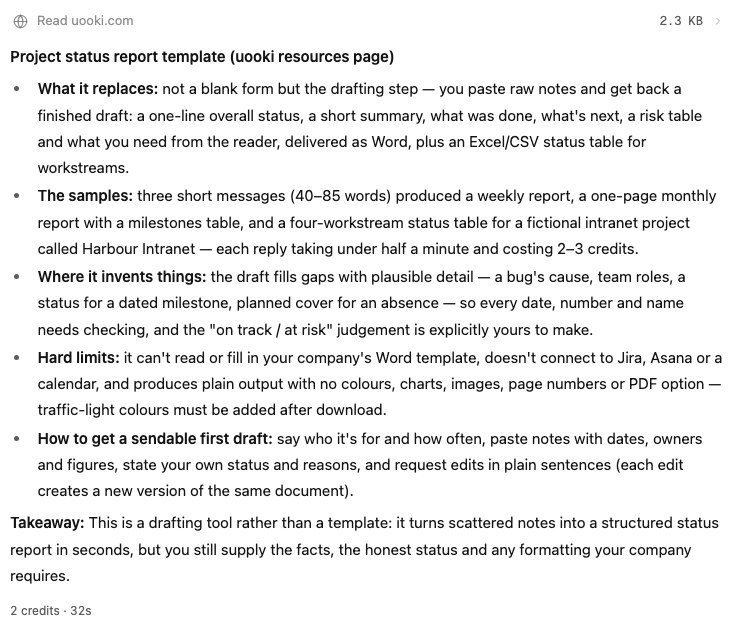
We pasted the link to one of our own guides and asked for five bullet points and a one-line takeaway. The chat showed a "Read uooki.com" line of 2.3 KB, then the five points and a takeaway. It took 32 seconds and the credit line showed 2 credits. No file was made.
The same request as a Word document
We asked for a one-page summary as a Word document. The page we named was not live yet, so the reply said it returned a 404, said that it had checked the site's own sitemap and used the nearest page on the same subject, and put a note saying so at the top of the document. That run took about three minutes and showed 16 credits.
A link to a page that does not exist
We pasted a made-up address. The reply said the site returns a 404 and there was nothing to summarize, quoted the one line the error page carried and offered to try again with the right link. It took 15 seconds and showed 1 credit.
An address on our own computer
We pasted a localhost address. The reply said it could not open it, because the page reader is blocked from private and local addresses, and listed what to do instead: paste the text, attach a saved copy of the page, or give a public link. It took 12 seconds and showed 1 credit.
A long public article
We asked for five points on a long encyclopedia article and asked whether it had read all of it. It answered with the points and said it had read the main text but not the reference list. That is what it said about itself; we did not check it against the page. It took 1 minute 20 seconds and showed 15 credits.
A real summary of one web page
Below is the chat reply for the first run. The first line is the page-reading step; the credit line and time are under the reply. The page it summarizes is one of our own guides, and the image is a screenshot.
What it does, and what is still yours
A summary is a shortened copy of one page as it was read, and you decide whether to trust it:
| The page or the request | What happened in our runs | Still yours to do |
|---|---|---|
| A public web page | Read by the page reader, summarized in the chat. A short reply took 32 seconds | Open the page for any number or quote you plan to repeat |
| A request for a document | A Word document was made. It takes longer and costs more than a chat reply | Read it before you send it on |
| A link that returns an error | The reply said so. It did not invent a summary | Find the right link and paste it again |
| A private or local address | Blocked. The reply said it cannot open it and suggested pasting the text or attaching a saved copy | Paste the text, or attach a saved copy of the page |
| A page behind a login | Not tested, so not promised | Save the page or paste its text into the message |
| A PDF link, a video link or a whole website | Not tested, so not promised | Ask for one page at a time and check the result |
Based on real runs on 2026-11-16, on our own pages and one public article.
How to get a good summary
Four things make the first answer closer to what you wanted:
- Paste one link at a time. One page per request keeps it clear which page each point came from.
- Say the shape you want. Five bullet points, a paragraph, a one-line takeaway or a one-page Word document. It follows what you ask for.
- Say what you care about. Prices, limits, dates, what changed. A summary of everything is longer and vaguer than a summary of what you need.
- Ask what it did not read. On a long page, ask whether it read all of it. Then open the page for anything that matters.
What this is not
It is not a browser extension and it does not sit on top of the page you are reading. You paste the link into uooki and the answer comes back in the chat.
It is not a promise that every page can be read. It cannot open private or local addresses, and we have not tested pages that need a login, PDFs, video links or whole websites. If it cannot read a page, the reply should say so, and you should not rely on a summary that does not say what it read.
And it is not a replacement for the page. A summary is shorter than the page and can leave out the thing you needed. Check any figure, quote or date against the page before you repeat it.
Run it yourself in uookiSummarize this web page in five bullet points and a one-line takeaway: https://uooki.com/en/resources/project-status-report-template
Frequently asked
How do I summarize a website with uooki?
Paste the link into the message and say what you want, for example five bullet points and a one-line takeaway. It reads the page and writes the answer in the chat. You can ask for a Word document instead.
Can it summarize a whole website?
We have only tested single pages, so we do not promise a whole site. Paste one page at a time.
Can it read a page behind a login?
We have not tested it, so we do not promise it. Save the page or paste its text into the message.
What happens when the link does not work?
In our run with a page that did not exist, the reply said the site returned a 404 and that there was nothing to summarize. It did not make up a summary. Check the link and paste it again.
Can it open a page on my computer?
No. It cannot open private or local addresses such as localhost. Paste the text or attach a saved copy of the page instead.
Does it work with PDFs or video links?
We have not tested links to PDFs or videos, so we do not promise them.
Is the summary always right?
No. It can leave things out, and on a long page it may not read all of it. Ask what it did not read, and open the page for any number, quote or date you plan to use.
How much does it cost?
A summary in the chat is a short run. Ours took 32 seconds and showed 2 credits. A Word document took longer, about three minutes and 16 credits. What a run uses depends on the page and what you ask for, so check the credit line on yours. You can try it on the free tier, which is $0 with up to 100 credits (one-time). Paid plans start at $10.75/mo billed yearly ($12.90 monthly).
Sources
- uooki pricing — checked 2026-11-16