The short answer
- Want a filled-in expense report, not an empty form? Say what you spent: the dates, what it was and the amounts. It builds the table with a line for each expense, subtotals if you ask for them, and a total at the bottom.
- Need Excel? The table downloads as an Excel file, or as CSV. In the Excel file, amounts written like $342.80 are numbers shown as money, and the total row is a formula that calculates when you open it.
- Will the total update inside uooki? No. On the canvas the total row shows the formula as text, such as =SUM(D2:D9), and does not calculate. The calculation happens in Excel after you download the file.
- Does it know your company's rules? No. It does not know your policy, your tax rules or the mileage rate that applies to you. It uses the figures you give it, so check them against your receipts and your policy.
What an expense report is for
An expense report is a list that lets someone else check what you spent and pay you back: a date, what it was, a category and an amount for each line, and a total. Reports for a business trip also tend to show the days away, and mileage claims show the distance and the rate. Most of the blank templates people look for are exactly this layout in a spreadsheet, with the totals left to you.
A blank template is fine when you have ten minutes and the receipts in front of you. It is less help when you are reconstructing a trip from memory and a card statement, which is when most reports get written. The work is to put each line in the right category, put the days in order and make the total match.
What the sample reports contain
Here are the three tables that came back from three short messages. The trip, the person and every vendor are invented:
A business trip report
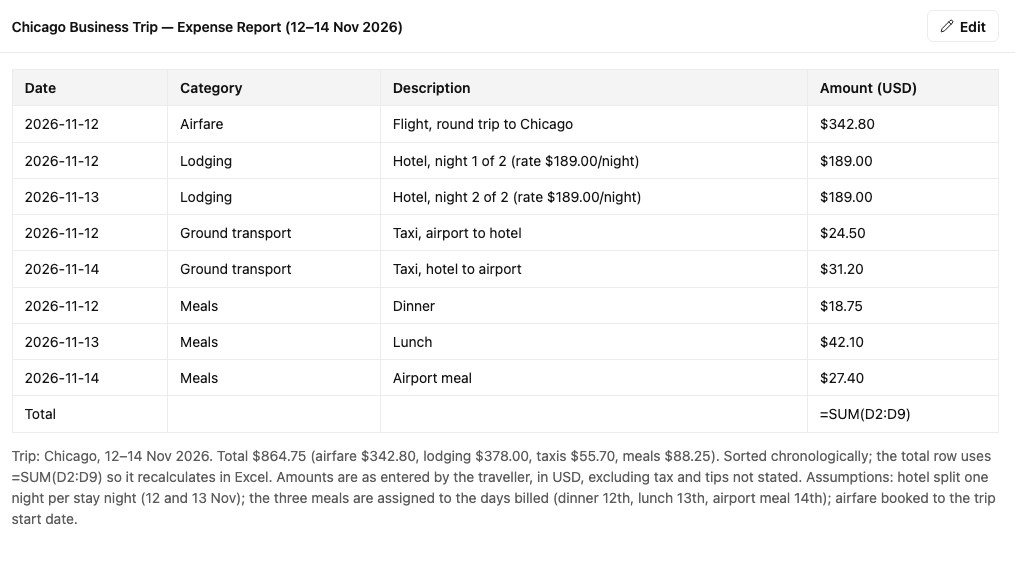
From one message of about 50 words: a flight, two hotel nights, two taxis and three meals for a trip to Chicago. It came back as eight lines, one for each charge, with a total row of =SUM(D2:D9). Added up, the lines come to $864.75.
A monthly report with subtotals
From a message asking for nine lines across travel, software subscriptions, meals and office supplies. Each category ended with a subtotal row of =SUM, and the grand total added the four subtotals. The model made up the vendors and dates, because we asked it to; the lines add up to $1,445.66.
A mileage claim
From a message giving two car trips of 86 and 142 miles at $0.67 a mile, with two parking charges and a lunch. The table has miles, rate and amount, with a total row. Each line amount, such as 86 × $0.67 = $57.62, was worked out when the table was made and is not a formula. The total is $206.06.
A sample expense report built from one sentence
Below is the business trip report as it appears on the uooki canvas. Note the last row: on the canvas the total is shown as the formula text, =SUM(D2:D9). In the Excel download it is calculated. The trip and every figure in it are invented, and the image is a screenshot of the result.
What it filled in that you did not say
A generated report fills gaps with plausible detail. In the business trip sample, that looked like this:
| What the message said | What the table said | Why it matters |
|---|---|---|
| "Meals: $18.75, $42.10 and $27.40" | Dinner on 12 November, lunch on 13 November and an airport meal on 14 November | No meal type or date was given. They were assigned in order, one for each day |
| "Hotel two nights at $189.00 a night" | Two rows of $189.00, dated 12 and 13 November, each marked with the rate | It split one charge into one line per night and chose the dates |
| "Two taxis ($24.50 and $31.20)" | The first as airport to hotel on 12 November, the second as hotel to airport on 14 November | The directions and dates were guessed from the order of the trip |
| "Flight $342.80" | One line dated 12 November | No date was given for the flight. It used the first day of the trip |
Based on real runs on 2026-11-16. The trip is fictional.
What the table does, and what is still yours
A generated report is a draft. The split looks like this:
| Part of the report | What you get | Still yours to do |
|---|---|---|
| Lines and categories | One row for each expense, sorted the way you ask, with the category you name or a sensible one | Check each line against the receipt and fix any date or category it guessed |
| Totals and subtotals | A total row, and a subtotal row for each category if you ask. In the Excel file they are =SUM formulas that calculate when you open it | Check the total against your statement. On the canvas the formula shows as text, so the figure appears only in Excel |
| Money formatting | Amounts written like $342.80, €9 or £0.50 become numbers shown as money in the Excel file | Other ways of writing amounts, such as "USD 12", stay as text. Use one currency and one style |
| Mileage and other calculations | Each line amount is worked out when the table is made, for example miles times a rate | The rate is the one you give. It does not look up a rate for you, and changing a miles figure later does not change the amount beside it |
| Colours, charts and your own layout | None. It makes one plain sheet, with no colours or charts, and it cannot read an uploaded spreadsheet to fill it in | Add formatting after download, or copy the lines into the form your employer requires |
| Receipts and approval | None. You type the amounts. It does not read receipts, check them or send the report anywhere | Attach the receipts, get the approval and submit the report yourself |
Based on real runs on 2026-11-16. The trip, the person and the vendors in the samples are fictional.
How to ask for an expense report
Four things make the first draft close to ready:
- Give the dates and the amounts. List each expense with its date, what it was and the amount. Write amounts the same way every time, such as $24.50, and use one currency.
- Say how to group it. By date, or by category with a subtotal for each. Say which, and it sets the table out that way.
- Ask for the total to be a formula. Say you want the total, and any subtotals, as formulas. Then they calculate in Excel and stay right if you change a figure there.
- Say what is missing. If you do not know the date of a meal or a taxi, say so, or it will guess. Then read the table against your receipts before you send it.
What this is not
It is not expense software. It does not read receipts, keep a record of your spending over time, route a report for approval or send it to your finance team. It builds one table from what you tell it, and that is all.
It does not tell you what you can claim. It has no knowledge of your employer's policy and gives no tax advice, and it does not know the mileage rate you are entitled to. Use the rate and the rules you have been given, and ask your finance team if you are unsure.
The table is plain. It is a single sheet with no colours and no charts. The total is a formula only once you have downloaded it as Excel; inside uooki it is text. If your employer needs its own form or layout, copy the lines across.
Run it yourself in uookiMake an expense report for my business trip to Chicago, 12 to 14 November 2026. Flight $342.80, hotel two nights at $189.00 a night, two taxis ($24.50 and $31.20), meals: $18.75, $42.10 and $27.40. One spreadsheet: date, category, description, amount in USD, and a total at the bottom.
Frequently asked
Can uooki fill in an expense report for me?
Yes. Tell it what you spent, with dates and amounts, and it builds the table with a line for each expense and a total. It can only use what you tell it, and it guesses at details you leave out, so read it against your receipts.
Can I download it as an Excel expense report template?
You can download the table as an Excel file, or as CSV. It is a filled-in table rather than a form with boxes for you to fill. If you want an empty spreadsheet to type into, a plain template from elsewhere does that and uooki is not the tool for it.
Are the totals formulas?
In the Excel download, yes: the total row is a SUM formula, and it calculates when you open the file. Inside uooki the same cell shows the formula as text, such as =SUM(D2:D9), because the canvas does not calculate. If a total comes out as plain text instead, ask for it again as a formula.
Will it work out mileage for me?
If you give it the miles and the rate, it works out each line, for example 86 miles at $0.67. It does not look up a rate for you. The line amounts are worked out once when the table is made, so if you change the miles later, ask it to update the amounts too.
Does it read receipts or invoices?
No. It works from the amounts you type in. It does not read, check or store your receipts.
Does it follow my company's expense policy or tax rules?
No. It does not know your policy and it gives no tax advice. Check what you can claim with your employer or your accountant.
Can it fill in my employer's own expense form?
Not directly. It cannot read an uploaded spreadsheet or form, so it builds its own layout. Ask for the table, then copy the lines into your form.
How much does it cost?
A one-table report is a short run. The business trip sample took 21 seconds and the credit line under it showed 6 credits. What a run uses depends on how much you ask for, so check the credit line on yours. You can try it on the free tier, which is $0 with up to 100 credits (one-time). Paid plans start at $10.75/mo billed yearly ($12.90 monthly).
Sources
- uooki pricing — checked 2026-11-16