The short answer
- What do you get? One HTML report with the month in numbers, where the demand sits, a score for the home page, five fixes in order, and a list of what the report cannot see. In our run it took 9 minutes 3 seconds.
- Where do the numbers come from? From the export you give it. The audit skill reads your pages and says in its own rules that it has no traffic, rankings or backlinks. In our run every click, impression, CTR and position matched the export.
- Did it make anything up? Yes. It added a modelled click-through curve and a figure of about 166 missed clicks a month, which are not in the export. The report labelled them as a model, but they are still not your data.
- What did we not test? Reading an attached file (it failed on our test setup), a real multi-page site, two months of data for a month-over-month view, a PDF, sending it to a client and any link to Search Console.
What a monthly client report is for
A client does not want a dashboard. They want to open one page and learn three things: how the month went, why, and what happens next month. Most of the work in a monthly SEO report is not finding the numbers. It is turning the same export into the same readable page every month.
In uooki you pick the Site audit skill, give it the address and paste or attach the export, and describe the report you want. The skill is written to audit what the pages themselves show. It says in its own instructions that it does not have traffic, rankings, backlinks or crawl logs. So the traffic part of a report comes from your export, and nothing else.
That split matters for what you can trust. The honest limit of this page is that it describes one run on a fake site with an eight-row export. It tells you what held and what did not in that run. It does not promise that your own report will be right.
What the real run did
We ran it on 2026-11-20 with a made-up Search Console export of eight queries for a coffee roaster, and the public placeholder address example.com. This is what happened, not a promise about every site:
The first request ran out of room
We asked for an audit of the pages and a report in one message. That turn used up its working budget before any report was built, and the reply said so. What it did give us in chat was the totals worked out from the export, which were right. It then asked for the real domain and last month's figures.
Asking for less gave a report
We started a new chat and asked it to audit only the home page and to build the report now. That gave one HTML report in 9 minutes 3 seconds: a score card, the month in numbers, a bar view of clicks by query, a table by query, five fixes, findings per area and a section on what the report cannot see.
The numbers from the export were not changed
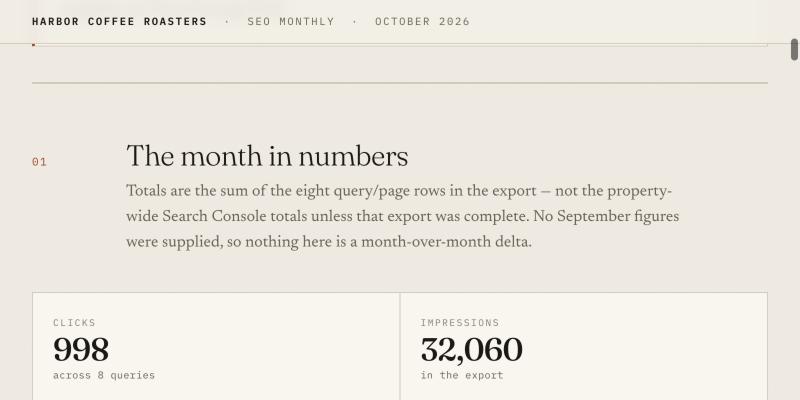
We checked them against the export one by one. Clicks added up to 998 and impressions to 32,060. The CTR of 3.11% was 998 divided by 32,060. The average position of 9.6 was weighted by impressions. The home page had 412 clicks, which was 41.3% of all clicks from 7.2% of the impressions. Each query kept the click count, CTR and position we gave it.
It said what it had not been given
We gave no September data, and the report said so and showed no month-over-month change. Its closing section said it could not see traffic outside the eight rows, rankings beyond the eight queries, backlinks, the rendered page and Core Web Vitals, or Google's index status, and it named where to look for each.
It added numbers that were not in the export
The report drew a modelled click-through curve by position and used it to say that about 166 clicks a month sit unclaimed across six queries, or 116 net. It called these modelled and indicative. They are an assumption of the report, not something in your export, and the click-through rates behind them, such as 15.7% at position 1.9, have no source on the page.
It wrote a few things we never said
It set the period as 1 to 31 October 2026 although we only said October, and it wrote a preparation date. It left the placeholder "[Your agency name]" in the footer. One sentence said the home page earns almost none of the clicks right next to the figure of 41.3%, which is the opposite.
The month in numbers, from the report we got
Below is the part of the report that shows the month in numbers, as it looks in a browser. The traffic totals are the sums of the made-up export. The audit score and the modelled click gap further down the page are not in the export; the click gap is made up by the report.
What we checked against the export, and what is still yours
We compared the report to the eight-row export we gave it. This is what we found:
| The part of the report | What we found | Still yours to do |
|---|---|---|
| Clicks, impressions, CTR, position per query | Copied as exported | Give it the real export, and say which rows it covers |
| Totals and averages | Summed correctly, and the position was weighted by impressions | Check the method fits how your client reads "average position" |
| Click gap from a model | Added by the report, not in the export | Delete it or ask for it to be left out |
| Report period and dates | Written by the report; we only said October | State the exact dates and year in your request |
| Home page score | Scored the placeholder page at the address, 8 out of 100 | Give the real address, and read the score only for pages it read |
| Month over month | None, because we gave one month | Give two exports if you want a change |
| Agency name | Left as a placeholder | Fill in your own name |
Based on one real run on 2026-11-20 with an eight-row export we made up.
How to get a report you can send
Five things made the second run work, and one would have helped the first:
- Start with one page, not the whole site. Our request for pages plus a report ran out of room. Asking for the home page only gave a report. Add more pages to the same chat afterwards and see what it says.
- Give the export as it comes. We used the columns Query, Page, Clicks, Impressions, CTR and Position, with the CTR written as a percentage. We pasted the rows into the message. When we attached the file, our local test setup could not read it, so we cannot say how that works for you.
- Say what it must not add. Write "use only numbers in the export, no estimates or benchmarks". We did not test whether that stops the modelled gap, so read the page either way.
- Give the exact month and your name. The period, the year and the agency name were guessed or left blank. Put them in the request.
- Check the numbers once against your export. Add up the clicks and impressions yourself. In our run they matched, but a report with one wrong figure is worse than no report.
What this is not
It is not connected to Search Console. It does not pull your data. It reads the export you give it, and an attached file did not work on our test setup, so check how you give it the data.
It does not send the report, schedule it or put your branding on it. We did not test a PDF, an email or a client login, and we saw no setting for any of them. A report you share is a link or a file you pass on yourself.
And it is not a fact source. The audit is only as good as the page it reads: an address that serves a placeholder gets a low score for the placeholder, not for your business. The numbers it adds beyond your export are guesses by the report. Read every figure before a client does.
Run it yourself in uookiMake a monthly SEO client report for https://example.com/ for October. Audit only the home page. Use the Search Console export below for every traffic and ranking number; build the report now.
Query,Page,Clicks,Impressions,CTR,Position
harbor coffee roasters,https://example.com/,412,2310,17.84%,1.9
buy coffee beans online,https://example.com/shop,96,5120,1.88%,8.4
single origin coffee subscription,https://example.com/subscribe,61,1840,3.32%,6.1
Frequently asked
Where does the traffic in the report come from?
From the Search Console export you give it. The audit skill says it has no traffic, rankings or backlinks of its own. In our run, every click, impression, CTR and position in the report matched the export.
Does it invent numbers?
It did not change the numbers we gave it, and it did not make up backlinks, traffic estimates or competitor figures. It did add a modelled click gap of about 166 clicks a month that was not in our export. It labelled this as a model. Remove it or ask for it to be left out.
Can I upload the Search Console file?
We did not get that to work in our test. Our local test setup had no code sandbox, so the attached file could not be read, and we pasted the rows into the message instead. We cannot say how an attached file behaves for you.
Can it show month-over-month change?
Only if you give it two months. We gave one month, and the report showed no change and said why. We did not test two exports.
Does it connect to Search Console?
No. We saw no connection. You give it an export, and it works from that.
Can I put my agency logo on it or send it to the client?
We found no branding, scheduling or sending in our run. The report had an "[Your agency name]" placeholder you fill in yourself, and you pass the report on yourself.
What if my site is not public yet?
The audit reads the address you give it. An address that shows a placeholder page got a score for that placeholder in our run, and the report said so first. Give it the live address.
How long does a report take?
Our report took 9 minutes 3 seconds on a local test setup, and the first, larger request ran out of room before any report. Time depends on the request, so yours may differ.