The short answer
- Want the short version of how to make a vision board? Pick three to six areas of your life, write one short goal for each, find or generate a picture that feels like it, arrange them where you will see them every day, and look at the board again each month.
- Want one without the cutting and gluing? Describe the board in one sentence: the year, your goals in your own words and the shape you want. In our three runs the image was ready in under a minute each.
- Will the text on the board be right? In our run with six written goals, every word was spelled correctly and easy to read. In another, one-word captions came out in lower case although we asked for capitals. Read every word before you print.
- Can you print it? Yes, but small. Our print-shaped board was 768 by 1,024 pixels, which is fine for a small print or a screen and too little for a large poster.
How to make a vision board in five steps
These steps work whether you use scissors or a screen:
- Decide what the board is for. A year ahead, a new job, a move, a habit. A board with one purpose is easier to look at than one that tries to hold everything.
- Choose three to six areas. Health, travel, work, home, learning, friends. Each area gets one tile. More than six and none of them stands out.
- Write one short goal for each. Write it as something you could see happen: "Run a half marathon", not "get fit". If a goal has a month or a number in it, keep it.
- Pick a picture that feels like it. Photos from magazines, your own pictures, or images you generate. Choose the ones that make you want to start, not the ones that look impressive.
- Put it where you will see it, and come back to it. Beside your desk, on your phone lock screen, inside a wardrobe door. Look at it once a month and change anything that no longer fits.
What a vision board is, and what it is not
A vision board is a picture of what you want, made so that you see it often. It is a reminder and a way to be specific about what you want, not a spell. Writing the goals down, putting a month or a number on them and looking at them regularly is what helps. The pictures make them easier to remember.
That is also why the words on the board matter more than they seem to. A board that says "Visit Japan in April" gives you something to book. A board with a pretty beach and no words gives you a mood. If you make one with uooki, spend your effort on the sentence you write, not on the layout.
What the three real runs did
We ran all three on 2026-11-24 on a local test setup, each from one sentence, with the default image setting. This is what happened, not a promise about every board:
A printable board with six goals
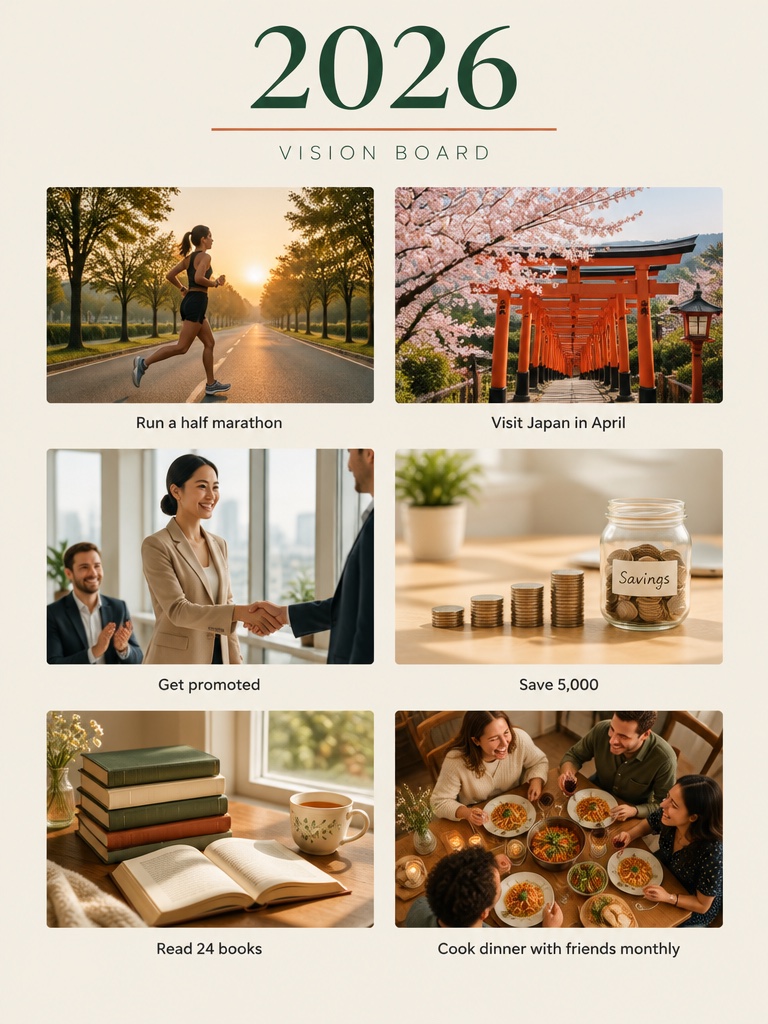
We wrote the six goals in quotes (a half marathon, Japan in April, a promotion, saving 5,000, 24 books, a monthly dinner with friends), asked for one photo per goal with the goal under it, a large "2026" at the top, and a 3:4 portrait shape. The image was 768 by 1,024 pixels, with a title, six photos in a grid and all six goals spelled correctly under their photos. It took 46 seconds.
A phone wallpaper
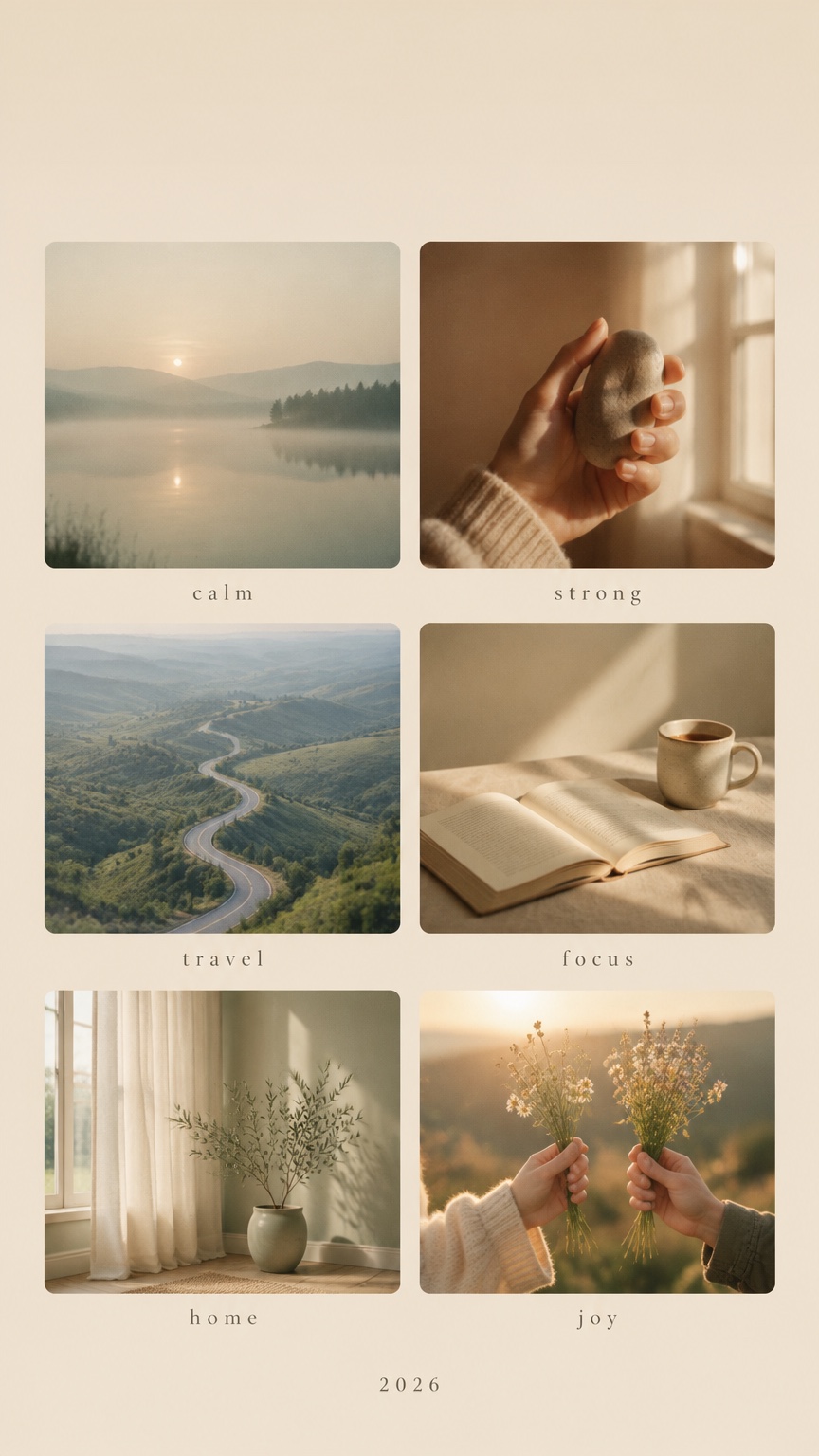
We asked for a vertical 9:16 image with six photos, one-word captions, and an empty area at the top for the phone clock. The image was 864 by 1,536 pixels. The empty area was there and the colours matched. The captions came out in lower case although we wrote them with capitals, and a small "2026" sat at the bottom. It took 46 seconds.
A collage with handwritten words
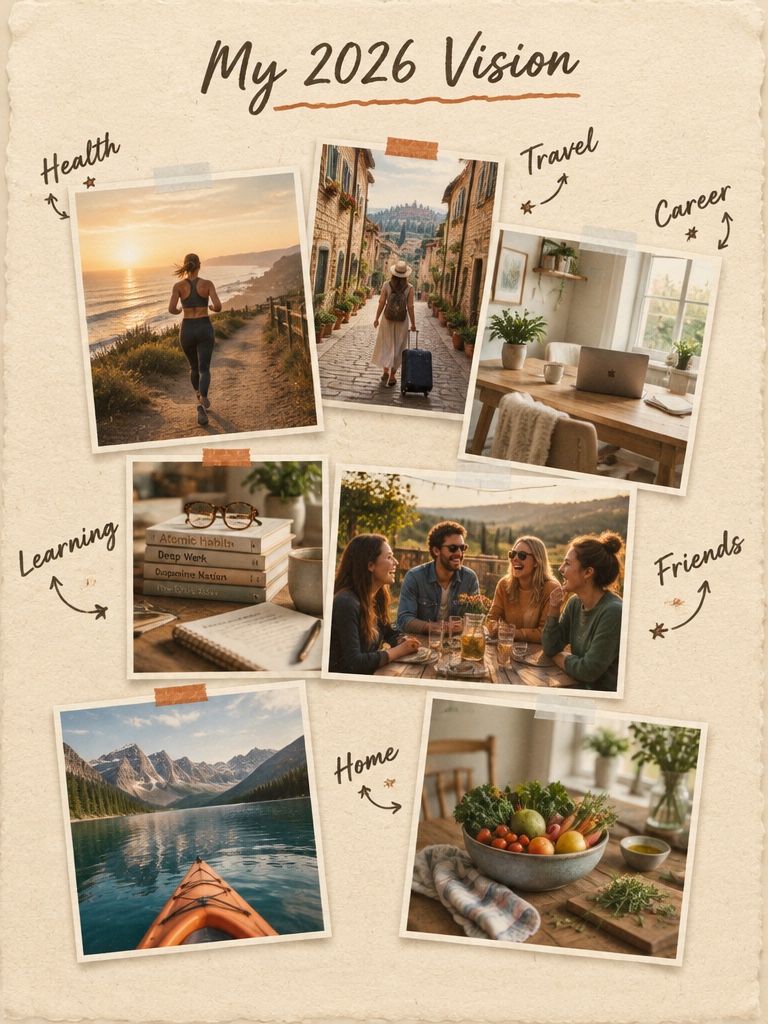
We asked for a collage of eight photos of different sizes, handwritten-style words (Health, Travel, Career, Home, Learning, Friends) and the title "My 2026 Vision" on a paper background. It looked the most like a vision board: photos at angles with tape, a handwritten title and the six words. It had six photos, not the eight we asked for. It took 41 seconds.
Each one was a single try
We made one image per board and did not regenerate any of them. A different run of the same sentence would look different.
The printable board, as it came out
This is the first board above, exactly as generated: six goals written by us, one photo each. The photos are made-up scenes. Every word on it is as the tool wrote it, and we checked them against our sentence.
The collage, as it came out
This is the handwritten collage. We asked for eight photos and it has six, so count before you decide it is right. The title and the six words are as the tool drew them.
The phone wallpaper, as it came out
This is the vertical wallpaper, with the empty area at the top that we asked for. The captions are in lower case because the tool wrote them that way.
What you get, and what is still yours to check
A generated board is a first draft you look over before it goes on a wall. These are the things we found, and the things to check:
| What you ask for | What we got | Still yours to do |
|---|---|---|
| Goals written on the board | All six goals spelled correctly in the print-shaped board | Read every word, and the digits, before you print |
| A set number of photos | Six photos when we asked for eight in one run | Count the photos. Ask again, or accept the number you got |
| Capital letters in captions | Lower case in the wallpaper run | Say it again in the sentence, or live with it |
| A print size | An image of 768 by 1,024 pixels | Small prints and screens only. Do not print it as a large poster |
| A phone wallpaper | A vertical image with the empty area at the top | Check that the clock and icons do not cover the photos on your phone |
| Both a print and a wallpaper | Two separate runs, each a new image | Ask for each shape on its own. It does not crop one into the other |
Based on three real runs on 2026-11-24, one image each, with the default image setting.
What this is not
It is not a template library. There is no list of ready-made boards to pick and fill in. Every board is made from your sentence, and a second run gives you a different board.
It is not a high-resolution print service. The boards we made are sized for a screen or a small print. We did not test a larger setting, so we do not promise one.
And it is not a promise that the words come out right. The words in the images are drawn by the tool, not typed, so one run can spell a goal perfectly and another can change a letter or its case. Read the words on every board before you use it.
Run it yourself in uookiMake a printable vision board for 2026 with my goals written clearly: "Run a half marathon", "Visit Japan in April", "Get promoted", "Save 5,000", "Read 24 books", "Cook dinner with friends monthly". One photo tile per goal, the goal text under each tile in a clean readable font, title "2026" large at the top. Make it a 3:4 portrait image.
Frequently asked
How do I make a vision board?
Decide what it is for, choose three to six areas of your life, write one short goal for each, pick a picture that feels like it, and put the board where you will see it. You can do that with paper, or describe it to uooki and get an image.
What should I put on a vision board?
Short goals you could see happen, each with a picture. Specific beats vague: "Visit Japan in April" gives you something to plan, a nice beach does not. Three to six areas are enough.
Can I make a digital vision board?
Yes. Ask for a vertical image if you want it as a phone wallpaper. In our run the image had an empty area at the top where the clock goes. We did not try it as a lock screen on a phone, so check how it looks there.
Will the text on the board be spelled correctly?
In our print-shaped run every goal was spelled correctly. In another run, captions came out in lower case. The words are drawn by the tool, so read every one before you print.
How big can I print it?
The print-shaped board we made was 768 by 1,024 pixels. That is enough for a small print or a screen and not for a large poster. We did not test a larger size.
Can I get exactly the number of photos I ask for?
Not always. We asked for eight photos once and got six. Count them, and ask again if the number matters to you.
Can I use my own photos?
We did not test uploading your own photos for a board, so we do not promise it. Our three boards used images generated from the sentence.
Can I change one tile afterwards?
We did not test editing a single tile of a finished board, so we do not promise it. Each of our boards was one try.
How much does it cost?
A board is a run like any other, and what it uses depends on what you ask for. Each of ours took less than a minute. Current plans and what each includes are on the pricing page.