The short answer
- Want a report you can send, not a blank form? Give it your notes and it writes the report: a short summary, an overall status, what was done, what is next, risks and what you need. You read it, correct it and send it.
- Need to fill in your company's own Word template? It cannot do that. uooki cannot read an uploaded Word file, so it builds its own layout. If your company requires a specific template, copy the text across yourself.
- Want red, amber and green status colours? Not in the Word file or the table: neither carries colours. The status is written as a label, such as On track, At risk or Off track. If you need coloured cells, add them after you download it.
- Is it right about the facts? Only as right as the notes you give it. It writes from what you tell it and does not look at your tasks, tickets or calendar. Check every date and number before the report goes out.
What a status report is for
A project status report has one job: let someone who is not in the work every day understand where it stands in about a minute. Most of the usual headings exist to serve that. An overall status tells the reader whether to worry. A short summary says why. What was done and what comes next show movement. Risks and issues say what could go wrong or already has, and the last section says what you need from the reader, because a report that asks for nothing rarely gets a reply.
The blank templates people search for are mostly that skeleton with boxes to fill. They are fine when you already know what to write. They are less help on the day you have a dozen scattered notes and twenty minutes, which is when most reports get written. The part that takes time is deciding what is the headline, what is noise and which risk is worth the reader's attention.
What the sample reports contain
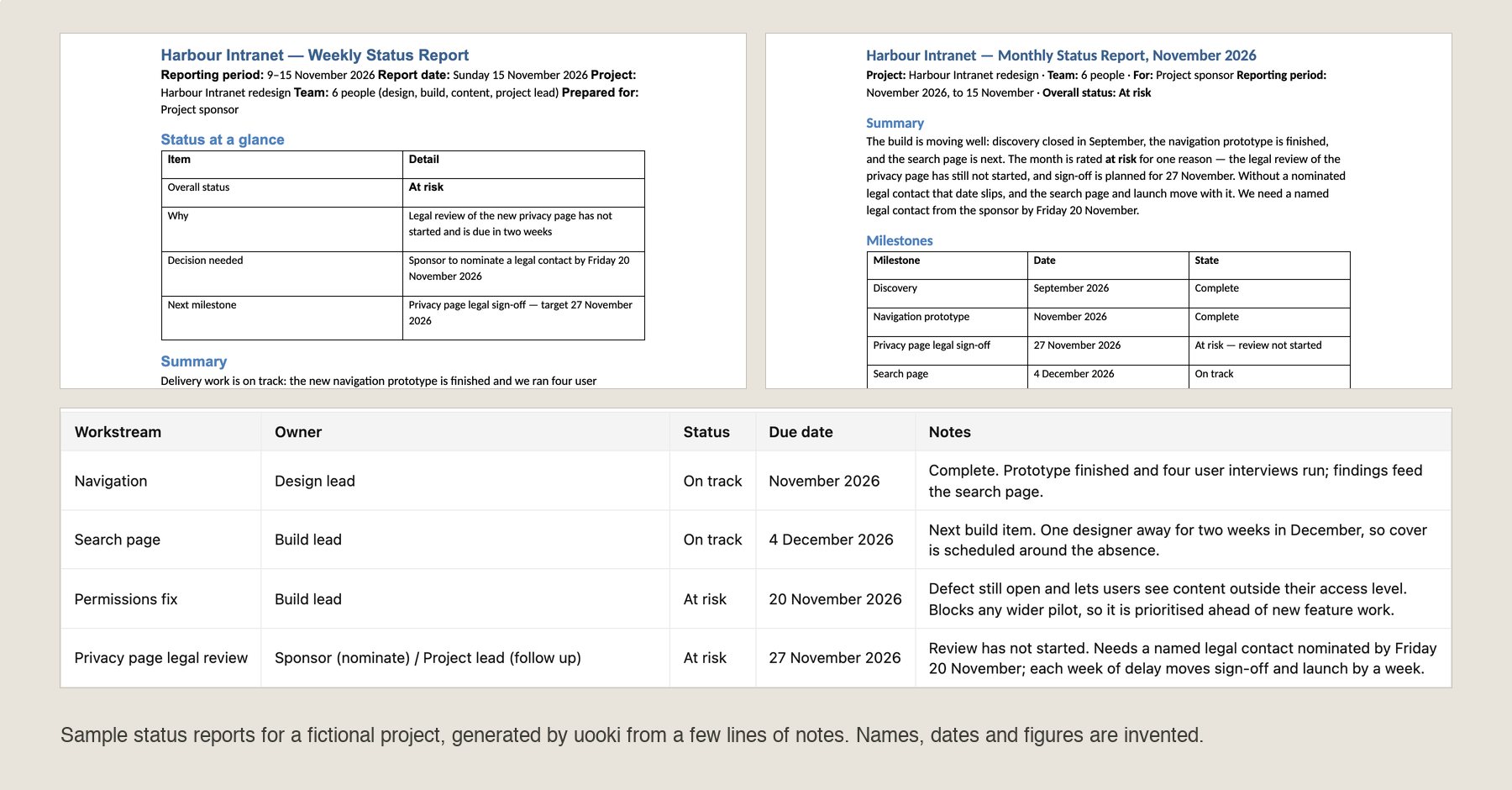
Here are the three files that came back from three short messages, written about an invented intranet redesign called Harbour Intranet:
A weekly status report (Word)
From one message of about 80 words. A status-at-a-glance table with the overall status, the reason and the decision needed, then a summary, what was done, what is planned, a risk table, what is needed from the sponsor, and notes.
A monthly status report (Word)
From a second message of about 85 words, asking for one page. A summary, a table of milestones with a date and a state for each, a paragraph on budget against schedule, one on people, a risk table and the decision needed.
A workstream status table (Excel or CSV)
From a third message of about 40 words. One row for each of four workstreams, with owner, status, due date and notes. The status is written as words: On track or At risk.
Sample status reports built from a few lines of notes
Below are the top of the weekly report, the top of the monthly report and the status table, as they appear on the uooki canvas. The project, the dates and the figures are all invented. The images are screenshots of the result.
What it added that was not in the notes
A generated report fills gaps with plausible detail. In the samples above, that looked like this:
| What the notes said | What the report said | Why it matters |
|---|---|---|
| "Fix the permissions bug" | The weekly report described the bug as one that lets users see content outside their access level | The cause and the effect were invented. The notes only gave the name of the bug |
| "A team of six" | The weekly report listed the six as design, build, content and project lead | The roles were invented. The notes gave only the number |
| Search page due 4 December | The monthly report marked the search page On track | The notes gave a date, not a status |
| "One designer is away for two weeks in December" | The monthly report and the table said the work "is scheduled around the absence" | Nobody had said any cover was planned |
| "Due in two weeks" | The weekly report dated the review 27 November and the report 15 November | It worked the dates out and said so in a note. The reply also told us about the date and the role names, but not about the other additions |
Based on real runs on 2026-11-15. The sample project is fictional.
What you get from your notes, and what is still yours
A generated report is a draft. The split looks like this:
| Part of the report | From your notes | Still yours to do |
|---|---|---|
| Summary and overall status | A short summary and a status label, worded from what you said | Decide whether the status is honest. A report that says On track when you know it is not helps nobody |
| Done and next | Your notes sorted into what happened and what is planned | Check dates and owners, and add anything you left out of the notes |
| Risks and issues | A table of risks, with likelihood and impact written as words, and a suggested next step | Judge which risks are real, and add the ones only you know about |
| Colours and charts | Not available. The Word file has no colours or charts and the table has none either | Add colour coding or a burn-down chart yourself after download |
| Your company layout | It builds its own headings and cannot read an uploaded Word file | Copy the text into your template if one is required |
| Live project data | None. It does not connect to a task tracker, ticket system or calendar | Paste in the figures you want in the report |
Based on real runs on 2026-11-15. The sample project and everything in it is fictional.
How to ask for a report
Four things make the first draft close to sendable:
- Say who it is for and how often. A weekly note to your own team and a monthly report to a sponsor are different documents. Say which you want, and it sets the length and tone to match.
- Paste the raw notes. Messages, bullets, half sentences are fine. Include dates, names of who owns what, and any number you want quoted, because it will not invent them for you.
- Tell it your own status. Say whether you think the project is on track, at risk or off track, and why. It writes the summary around your judgement rather than guessing one.
- Ask for changes in plain sentences. Shorter, less detail on risks, a separate section for decisions you need. Each change makes a new version of the same document instead of a copy.
What this is not
It is not project management software. It does not track tasks, pull progress from a tracker or remind anyone to send the report; it writes one document from what you give it. It does not fill in a template you already have, because it cannot read an uploaded Word file. And the Word file is plain: headings, paragraphs, lists and tables, with no images, no links, no headers or footers, no page numbers and no table of contents.
The table is just as plain. It is a single sheet of text cells you can download as Excel or CSV, with no colours, no charts and no formulas that run on the canvas. If your report needs a coloured status grid or a chart, you will be adding those in your own spreadsheet or presentation software after download.
Finally, it can only be as accurate as your notes. A report that sounds confident and is wrong is worse than a rough one that is right, so read every date, number and name before you send it.
Run it yourself in uookiWrite a weekly project status report for a team of six redesigning our company intranet. Overall status: at risk. Done this week: finished the new navigation prototype and ran four user interviews. Next: build the search page, fix the permissions bug. Risk: the legal review of the new privacy page has not started and is due in two weeks. I need the sponsor to nominate a legal contact by Friday.
Frequently asked
Can uooki write a project status report for me?
Yes. Give it the facts and it writes the report as a Word document, with a summary, an overall status, what was done, what is next, risks and what you need. In the samples on this page, a few lines of notes were enough for a report you can read and edit. It cannot know what you do not tell it.
Is this a downloadable template I can fill in myself?
No. It is not a blank form. If you want a report with the headings already filled in from your own notes, that is what it does. If you want an empty file to type into, a generic template from elsewhere will do that and uooki is not the tool for it.
What file do I get?
A Word document you download as a .docx file, and a table you download as Excel or CSV. The Word download offers only the .docx file, with no PDF option. The Word file has headings, paragraphs, lists and tables, and no images, links, page numbers or table of contents.
Can it add red, amber and green colours?
No. Neither the document nor the table carries colour. Status is written as words: On track, At risk, Off track. Colour the cells yourself after downloading if you want the traffic-light look.
Can I use my company's Word template?
Not directly. It cannot read an uploaded Word file, so it cannot fill in your template. Ask for the report, then copy the text across.
Does it connect to Jira, Asana or a spreadsheet of tasks?
No. It has no connection to task trackers. It works from the notes and figures you paste into the conversation.
How often can I reuse it?
As often as you like. A common way is to keep last week's report, paste it with this week's notes and ask for the next one. Changing a document you made earlier creates a new version of it rather than a copy.
How much does it cost?
A report is a short run. In the samples on this page, each reply took under half a minute and the credit line under it showed 3, 3 and 2 credits. What a run uses depends on the length of what you ask for, so check the credit line on yours. You can try it on the free tier, which is $0 with up to 100 credits (one-time). Paid plans start at $10.75/mo billed yearly ($12.90 monthly).
Sources
- uooki pricing — checked 2026-11-15