The short answer
- Want a sheet that is already filled in? Describe what you track and how you want it laid out. In our run, one sentence about a flower shop produced a table with 14 products, 13 columns and a total row. It took about five minutes.
- Need several sheets, a dropdown or formulas? Ask for them in the sentence. In our second run we asked for three sheets, a status dropdown, a red highlight on low stock and formulas, and the file we downloaded had all of them. It took about three and a half minutes.
- How do you get it into Google Sheets? Download it as an Excel file or as CSV, then import it. There is no button in uooki that saves it straight into your Google Drive.
- Is there a library of templates to pick from? No. Each sheet is made from your sentence. If you want to browse ready-made layouts, this is not that.
What a template does not do for you
A template is someone else's answer to a question you have not told them. A stock sheet for a flower shop and a stock sheet for a bike repair shop both need a product column, but the rest differs: flowers have waste, bikes have parts that are ordered in. You end up renaming columns, deleting the ones you do not need and adding the ones you do.
In uooki the question comes first. You say what you track, how often and what you want to see at the bottom, and the sheet is built around that. You still check it, because the sample rows are invented and the columns are only as good as the sentence. But you start from a sheet shaped like your problem, not one shaped like a stranger's.
What the two real runs did
We ran both on 2026-11-18 on a local test setup, with made-up shop data. This is what happened, not a promise about every sheet:
A simple table from one sentence
We wrote: "I run a flower shop with three staff. Make me a spreadsheet to track weekly stock and sales: one row per product, with sample data, and a total row at the bottom." It made a table of 14 products and 13 columns: product, category, unit, cost, price, opening stock, received, sold, wasted, closing stock, revenue, stock value and a reorder figure. The last row is labelled TOTAL. It took 5 minutes 7 seconds.
What was in the downloaded Excel file
We downloaded it as Excel and read it back with a script. Amounts and counts such as 1,170.00 and 468 were numbers, not text. Whole numbers written with a thousands comma, such as 2,035, were still text, so they would not add up. In that run the total was a calculated value, not a formula.
A workbook with several sheets, a dropdown and formulas
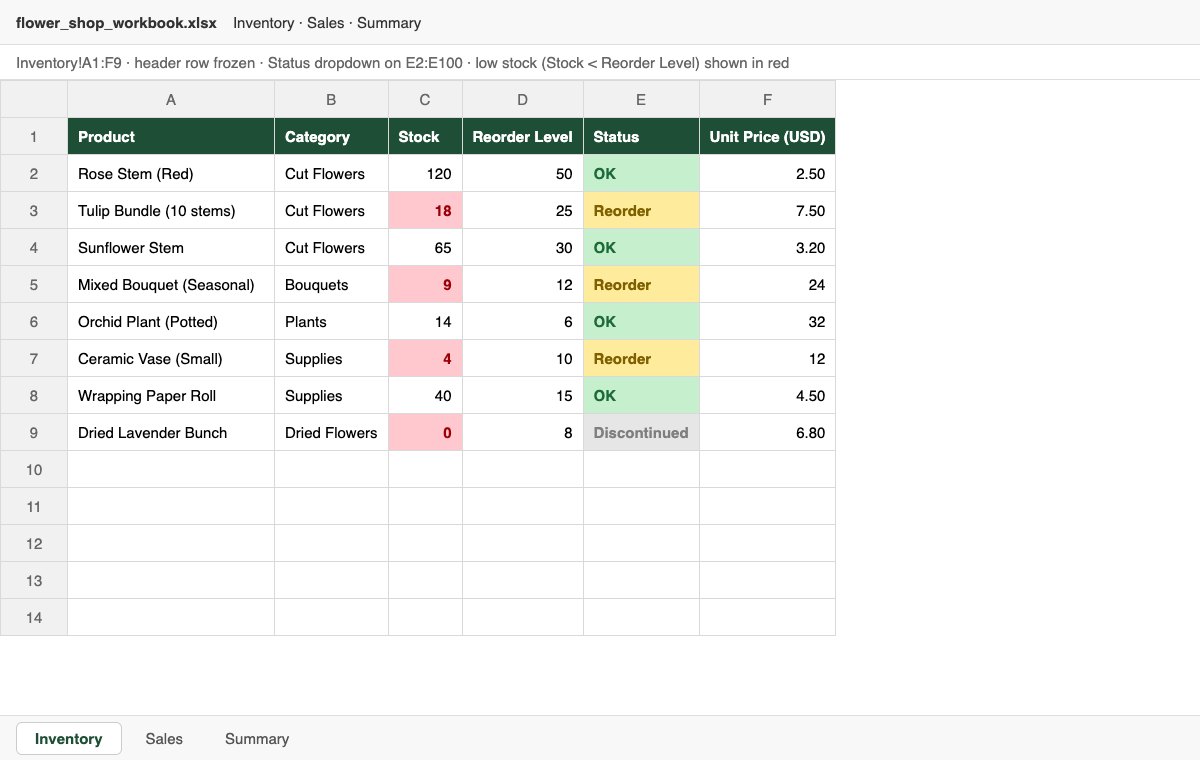
We asked for three sheets, a Status dropdown with OK, Reorder and Discontinued, a red highlight on the stock cell when stock is below the reorder level, a line total as a formula, a price looked up from the first sheet, and a summary with a SUM and a count. It built a real Excel file with sheets called Inventory, Sales and Summary. It took 3 minutes 21 seconds.
What we found when we opened that file
Read back with a script: the dropdown is applied to the Status column down to row 100, the red highlight rule covers the stock column down to row 100, the Sales sheet has a lookup formula and a multiplication formula on each row, the Summary sheet has =SUM and =COUNTIF, and the top row of the Inventory and Sales sheets is frozen. The formulas are formulas, not typed numbers. The file is set to calculate when you open it.
The Inventory sheet, as it came out
Below is the Inventory sheet of the flower shop workbook from the second run, drawn from the cells of the downloaded file: the header, the red low-stock rule and the Status colours are the file's own. The data is made up. It is a drawing of the file, not a screenshot of Excel or Google Sheets.
What you get, and what is still yours
A sheet that is generated is a first draft with real structure. These are the things we checked, and the things to check yourself:
| What you ask for | What the downloaded file had | Still yours to do |
|---|---|---|
| A simple table with a total row | One sheet, numbers as numbers. Whole numbers with a thousands comma stayed text | Check the total, and retype any number that is left-aligned |
| Several sheets | Three sheets in one Excel file, named as you asked | Rename or reorder them after you open the file |
| Formulas | Row formulas and SUM and COUNTIF, written as formulas | Open the file and check that the figures make sense for your data |
| A dropdown on a column | A dropdown on the Status column, down to row 100 | Extend the range if you have more rows than that |
| Highlighting | A rule that turns low stock red | Check the rule against your own reorder levels |
| Charts, pivot tables, scripts | Not tested, so not promised | Add them in your spreadsheet app |
Based on two real runs on 2026-11-18, with made-up shop data, read back with a script.
How to get a sheet that fits
Four things make the first sheet closer to what you wanted:
- Say what one row is. One product, one sale, one customer, one day. Everything else follows from that.
- Name the columns that matter. If you know them, list them. If you do not, say what question the sheet has to answer and let it propose the columns.
- Say what should add up. A total, a subtotal per category, a count of items to reorder. Ask for formulas if you want the figures to update when you change a number.
- Ask for what you need around it. More than one sheet, a dropdown on a status column, a highlight for anything below a limit. Ask for these by name and then check each one.
What this is not
It is not a template gallery. There is no list of ready-made sheets to browse and copy. Every sheet is made from your sentence.
It is not a connection to your Google account. uooki does not save the sheet into your Google Drive. You download a file and import it yourself.
And it is not a guarantee that the sheet is right. The sample rows are invented, and a formula can be wrong for your data. Replace the sample rows with your own and check the totals before you rely on them.
Run it yourself in uookiI run a flower shop with three staff. Make me an Excel workbook with three sheets: Inventory with a Status dropdown (OK, Reorder, Discontinued) and low stock highlighted in red, Sales with formulas for the line total, and a Summary with a total and a count of items to reorder. Use sample data.
Frequently asked
Where do I find Google spreadsheet templates?
There are plenty of lists of them. This page is for the case where you would rather say what you track and get a sheet built for it. Each sheet is made from your sentence, so there is no library to browse here.
Can I save the sheet straight into Google Sheets?
No. You download it as an Excel file or as CSV and import it into Google Sheets yourself. uooki does not save to your Google Drive.
Do the formulas still work after I download the file?
In our second run the downloaded file had its formulas as formulas, and it is set to calculate when you open it. On the canvas inside uooki a formula can show as text, so check the figures in your spreadsheet app, not on the canvas.
Can it make a sheet with more than one tab?
Yes. When you ask for several sheets, formulas that look across sheets, a dropdown or highlighting, it builds a real Excel file instead of a single table. In our run that file had three sheets named as we asked. You open it in your spreadsheet app.
Why is one of my numbers left-aligned?
In our first run, whole numbers written with a thousands comma, such as 2,035, came out as text in the Excel file. Retype them without the comma, or ask for numbers without thousands separators.
Does it make charts or pivot tables?
We have not tested charts or pivot tables in a sheet, so we do not promise them. Add them in your spreadsheet app.
Does the CSV open correctly with accents or Chinese and Japanese text?
The CSV file starts with the marker that Excel uses to read accents and non-Latin text. We have not opened it in every spreadsheet app, so check yours.
How much does it cost?
A sheet is a run like any other, and what it uses depends on what you ask for. A simple table took about five minutes and a workbook with several sheets about three and a half in our runs. Current plans and what each includes are on the pricing page.