The short answer
- Want the pages of a booking site, fast? That is the use. One written brief produced six pages for an invented pilates studio: home, classes and prices, a weekly timetable, instructors, opening hours and how to find it, and a booking page.
- Need people to book a place for real? It will not do that. The sample booking page lets you pick a class, a day and a time and shows a confirmation, but it saves nothing, sends nothing and reserves nothing, and the page says so. For real bookings you need a separate booking service, and uooki does not set one up.
- Does it show real availability? No. The places left, the full classes and the waitlist in the sample are fixed figures written into the page. Nothing updates when someone "books".
- What should you ask for instead? The pages, the prices, the timetable and a clear way to reach you or to reach your booking service. Those are the parts it can build well.
Booking page or booking system: which do you need?
A booking page tells people what they can book and how. A booking system keeps the bookings. The difference matters because they fail in different ways. A page with a mistake in the price is easy to fix. A system that lets two people take the last place in a class, or forgets a booking, loses money and trust.
For a very small business the honest answer is often a page with the times and prices and a clear way to get in touch, or a link to a booking service. Anything with limited places, deposits, reminders or cancellations needs a system. uooki builds the first kind of site and can lay out a convincing booking flow, but the system part has to come from somewhere else.
What the sample site contains
Here are the six pages of an invented studio, built from one written brief and no follow-up messages:
Home
A headline, four facts about the studio, its story, a list of the next classes taken from the same data as the timetable, and a short walk-through for first-time visitors.
Classes and prices
Seven kinds of class with a price for each, four ways to pay, notes on cancellation and concessions, and five questions answered.
Timetable
A week of 29 classes as a grid on a computer and as stacked days on a phone, with filters by class type and a marker for today. Each class links to the booking page with that class, day and time already chosen.
Instructors
Two instructors in depth, with drawn portraits rather than photographs, and the three people around them.
Visit
A drawn street plan of the invented town, opening hours that highlight today, three ways to arrive and notes on access.
Booking
Four steps: class, day, time, then name and email. A summary panel updates as you choose, and confirming shows a ticket with a reference. It is a demonstration, covered in its own section below.
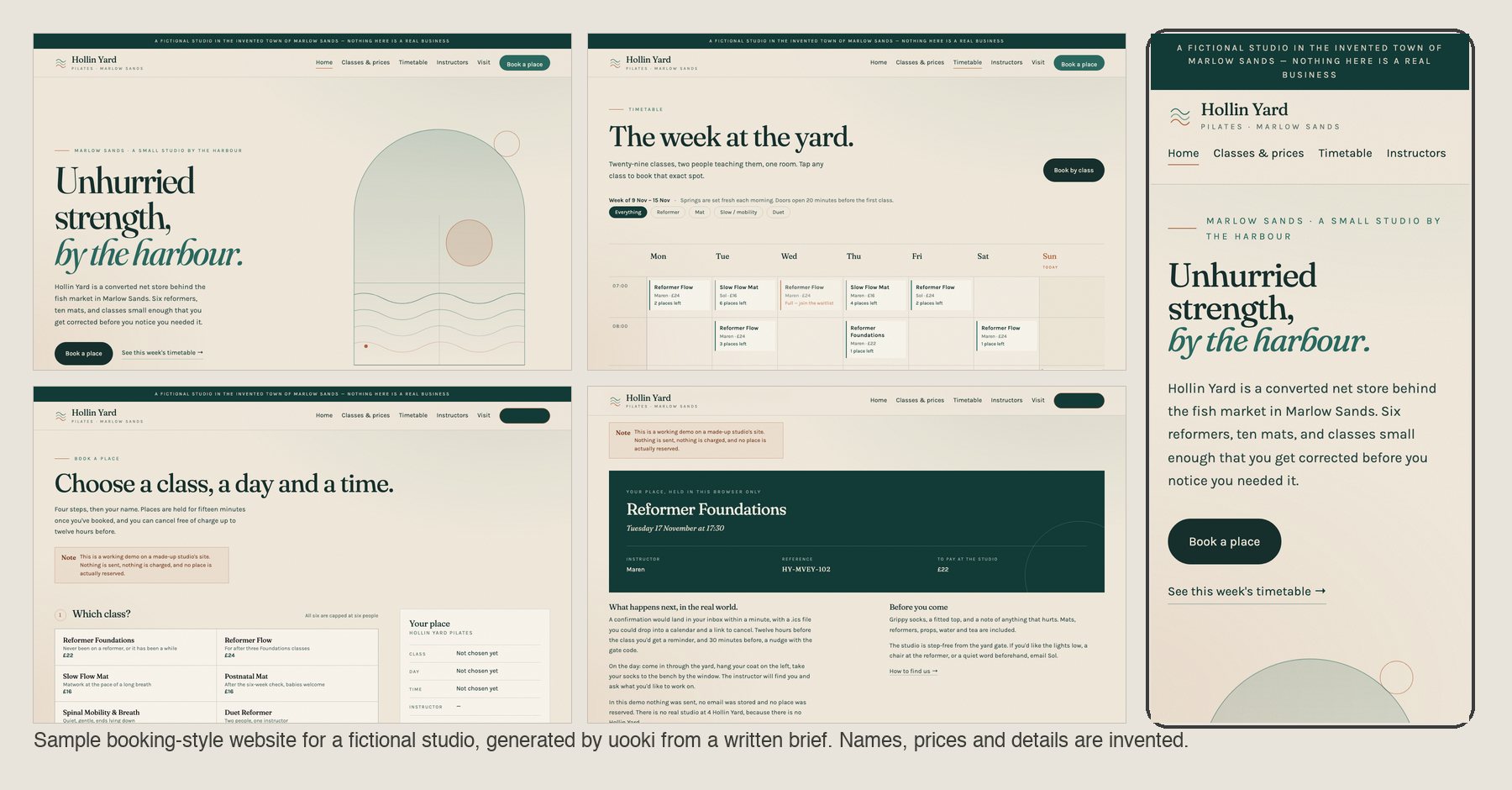
A sample booking-style site built from one written brief
Below are the home page, the timetable, the top of the booking page with its demonstration note, the confirmation ticket, and the home page on a phone, for a fictional studio in an invented town. Every name, price and time is invented, and every page says so. The images are screenshots of the result.
What the sample booking page does, and what a real one needs
The demonstration looks complete. This is what is behind it:
| Step in the sample | What happens | What a real booking site needs |
|---|---|---|
| Pick a class, a day and a time | The page filters its own list and updates a summary panel | A shared calendar that all visitors see, so a taken place disappears for everyone |
| Places left and full classes | Fixed figures written into the page | Live availability, kept up to date as people book and cancel |
| Confirm this place | A ticket with a reference appears on your screen only, and the page calls it "held in this browser only" | Somewhere to store the booking, and a way for the studio to see it |
| Confirmation email and reminders | None sent. The page describes them in the future tense, as what a real site "would" do | An email service, and rules for when to send what |
| Payment | None taken. The page says the price is paid at the studio | A payment provider if you want deposits or prepayment |
| Cancelling or moving a booking | Nothing to cancel, because nothing was booked | A way for people to change a booking, and for you to see the change |
Based on a real run on 2026-11-15. The sample studio and everything about it is fictional. We checked the booking flow in a browser: choosing a class, a day and a time and confirming made no network request.
How to make a booking website with uooki
Five steps give you the parts that it can build:
- Decide what booking means for you. If people only need to know your times and prices and then call or message you, you may not need a system at all. If places are limited, or you want deposits, plan to use a separate booking service.
- Describe the business and list the pages. Home, services and prices, timetable or opening hours, who you are, how to find you, and how to book. Say how many classes or services there are and what each costs.
- Say what the booking page is. Ask for a page that tells people how to book, with your contact details, or with a button that links to your booking service. If you ask for a booking flow, you will get the demonstration described above, so know that going in.
- Set the look and what to leave out. The sample brief asked for sand and teal and no stock photos, and the site has none. Say what you do not want.
- Connect a real way to book. Set up a booking service outside uooki, then ask for a button or link to it on the page. A link is the safe way to do it. We have not tested putting any service's booking widget directly onto a page, so this page does not promise that it works.
What this is not
It is not a booking system. There is no calendar that all visitors share, no saved bookings, no confirmation emails, no reminders and no payments. The "places left" in the sample are part of the demonstration. If you publish a page like the sample as it is, visitors will believe they have booked, so do not publish a demonstration booking flow on a real business site unless it clearly says it is not real.
It is not a content management system either, so there is no editor for your receptionist to change a time next week; you change the site by asking the agent. It does not host a site on your own domain, and it makes no promise about how long a published page stays online.
And the sample took one message that ran for more than ten minutes. The agent also reviewed its own pages and fixed a handful of problems, including a form that stayed on screen after confirming. Expect to read the result yourself and ask for changes.
Run it yourself in uookiBuild a website for a small yoga studio in Leeds: home, classes and prices, a weekly timetable, the teachers, how to find us, and a booking page that explains how to book and links to our booking service. Soft green and cream, no stock photos. Every page is its own file with the same navigation at the top.
Frequently asked
Can uooki make a booking website?
It can make the website: the pages, the prices, the timetable, the contact details, and a booking page that looks and behaves like a real one. It cannot make the booking system. In a real run, one written brief produced six pages for a fictional studio, and the booking flow on them saved and sent nothing.
Do bookings made on the sample page get saved?
No. The page says nothing is sent, nothing is charged and no place is reserved, and in our check the booking flow made no network request. The ticket it shows exists only in the browser tab of the person who made it.
Are the places left and the full classes real?
No. They are fixed figures written into the page by the generator, to make the demonstration look like a real timetable. They do not change when someone books.
Can it send confirmation emails or take payments?
No. Neither is built, and the sample page describes the email only as something a real site would send. For emails and payments you need a booking service or a payment provider, set up outside uooki.
How do I take real bookings, then?
Use a separate booking service, and link to it from the page uooki builds. We have not tested placing a particular service's widget on a page, so we only describe the link, which is an ordinary link on an ordinary page.
Can I use my own domain?
uooki has no custom domain support. You can open and share what it builds, and if you want the site on your own domain, the pages need to be hosted somewhere else.
How long does it take and what does it cost?
The sample was one message that took more than ten minutes to finish. The credit line under the reply showed about 131 credits for the whole six-page site, though what a run uses depends on the brief. You can try it on the free tier, which is $0 with up to 100 credits (one-time). Paid plans start at $10.75/mo billed yearly ($12.90 monthly).
Does it work for other kinds of business?
The approach is general, since you describe the pages and the tone, but this page reports only the one studio sample we built, so we make no claim beyond that.
Sources
- uooki pricing — checked 2026-11-15