The short answer
- Want a finished SOP rather than a blank form? Describe the process in one sentence. In our three runs the Word file was on the canvas in under three minutes, and each one had well over two thousand words, with tables and numbered steps.
- Not sure what an SOP is? It is a written, step-by-step way of doing a task so that anyone trained gets the same result. The section below explains what goes in one.
- Can you change it? Yes. Ask for changes in the chat, or download the Word file and edit it. The numbers in our examples, such as times and limits, were invented by the tool, so replace them with yours.
- Is it a library of templates? No. Each SOP is written from your sentence. If you want to browse ready-made forms, this is not that.
What is a standard operating procedure?
A standard operating procedure, or SOP, is a written description of how a recurring task is done. It says who does it, what has to be ready before it starts, the steps in order, and what to do when something does not go to plan. The point is that two people who follow it get the same result, and a new person can learn the task without asking the one colleague who remembers.
It is different from a policy, which says what is allowed, and from a checklist, which is a list of things to tick off. An SOP usually contains both: the rules that apply and a checklist at the end, with the reasoning for each step in between. You need one wherever a mistake is expensive or hard to spot later: opening and closing a shop, handling a refund, receiving a delivery, cleaning equipment, onboarding a new hire.
What a good SOP contains
The three files we generated all followed roughly the same outline, which is a sensible one to ask for:
Purpose and scope
Why the procedure exists, what it covers and what it does not. This stops it from growing into a manual for everything.
Roles and responsibilities
Who does each step and who signs off. A step without a named role is a step nobody owns.
Before you start
What has to be ready: the paperwork, the equipment, the information. Most failures happen here.
Steps in order
One action per step, written so that a trained person can follow it without guessing. Numbers beat paragraphs.
What to do when something is wrong
The exceptions: damage, shortage, a refused request, a missing person. The step that says who to call is the one you will need on the bad day.
Records and review
What gets written down, where, and when the procedure is reviewed. An SOP nobody reviews goes out of date.
What the three real runs did
We ran all three on 2026-11-24 on a local test setup, each from one sentence about a small business. This is what happened, not a promise about every SOP:
Opening a small restaurant each morning
We asked for who does what, in order, with a checklist and what to do if something is wrong. The Word file had 11 numbered sections, from purpose and scope through a timeline of the morning, seven phases of step-by-step instructions, an opening checklist, the limits for "in range", and what to do when something is wrong. It had eight tables and about 2,580 words. It took 2 minutes 25 seconds.
Handling a customer refund in an online shop
We asked for how to verify the order, when to approve or refuse, who signs off above a set amount, and how to record it. The file opened with a document control table, then purpose, scope, definitions, roles, a table of approval levels, seven steps from receiving the request to closing it, special cases such as a chargeback, a list of things staff must never do, and a one-page checklist. It had nine tables and about 2,410 words. It took 55 seconds.
Receiving a supplier delivery at a small warehouse
We asked for checking the paperwork, inspecting the goods, handling damage or shortages and putting stock away. The file had eight numbered steps, five ways to handle a discrepancy (damage, shortage, overage or wrong item, refusal, a driver who will not sign), two appendices and nine tables. It had about 2,440 words and took 1 minute. One thing we noticed: it had no title line at the top, so the first heading was "1. Purpose". Add a title yourself.
What we checked in the files
We downloaded each one as a Word file and read it back with a script: headings, numbered steps and tables were real Word elements, not pictures of them. The three files covered purpose, scope, roles, the steps and what to do when something goes wrong. We did not check them against any law or industry standard.
The refund SOP, as it came out
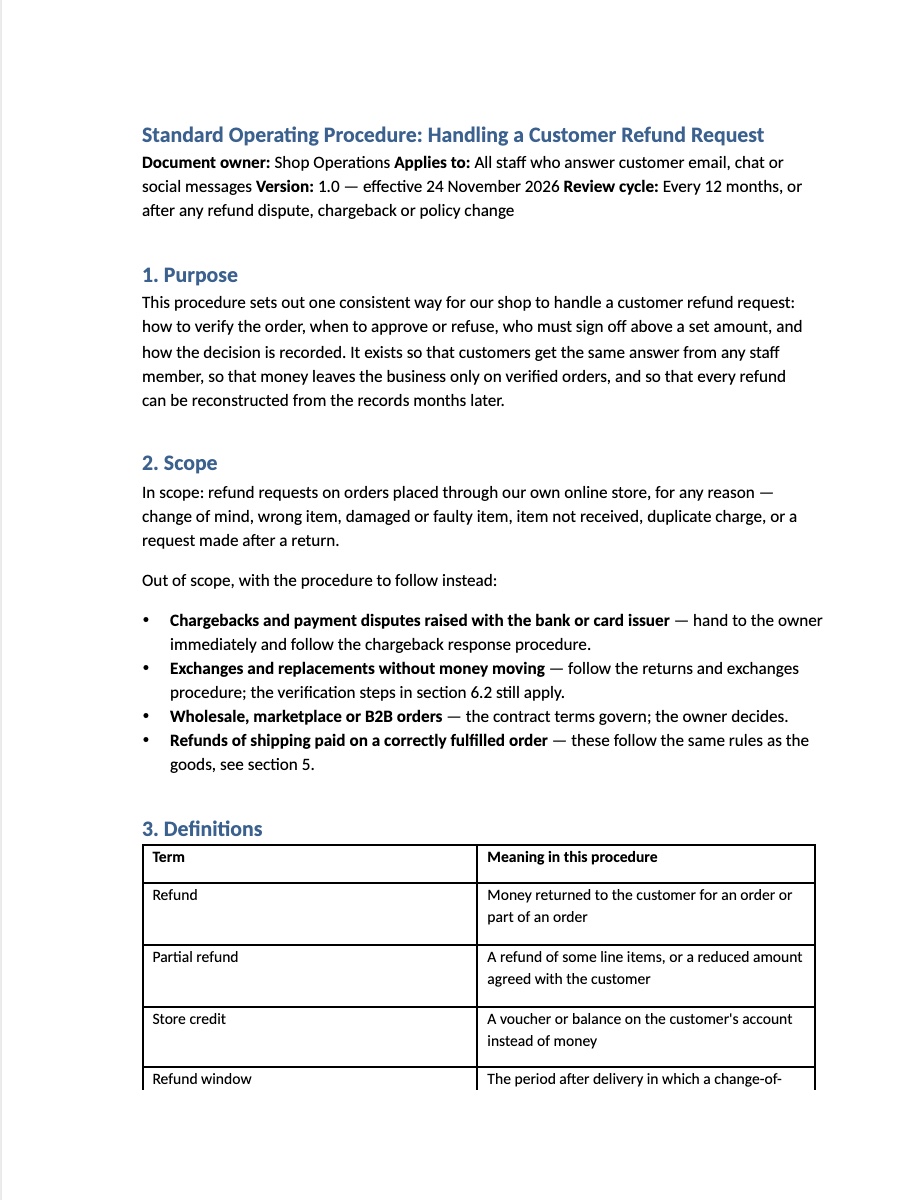
Below is the top of a refund SOP as it appeared on the canvas before downloading: the owner and version lines, purpose, scope and the start of the definitions table. We took this screenshot from a later run of the same sentence, so it is not the file described above; each run writes a different document. The shop and the dates are made up. It is a screenshot of the canvas on our test setup.
What you get, and what is still yours
A generated SOP is a complete first draft. These are the things we found, and the things to check before anyone follows it:
| What you ask for | What the file had | Still yours to do |
|---|---|---|
| A procedure for a named process | Purpose, scope, roles, steps, exceptions and records, with tables and numbered steps | Read every step and delete or change the ones that do not match how you work |
| Limits, times and approval amounts | Specific numbers in every file, such as time windows and approval levels | Replace them. The tool made them up as examples |
| A checklist | A checklist in the restaurant file and an appendix checklist in the other two | Check it against the steps, and print it if you want a tick sheet |
| A title and document control | Two of the three files had a title line and two had a document control section; the warehouse file had no title line, and the restaurant file had a revision history instead | Add a title, document number, owner and review date |
| Legal or safety rules | Mentions of safety and law in some places | Not checked against any law or standard. Have the person responsible confirm them |
| Your logo, headers, page numbers, a table of contents | Not tested, and the Word export does not render images, headers, footers or page numbers | Add them in Word after you download |
Based on three real runs on 2026-11-24, with made-up business details, read back with a script.
How to get an SOP that fits
Five things make the first draft closer to what you need:
- Name the process and where it starts and ends. Opening the shop, refunding an order, receiving a delivery. Say what triggers it and what counts as done.
- Say who is involved. Roles, not names: cashier, manager, driver. If an approval is needed above a limit, say who approves.
- Tell it what goes wrong. Damage, a missing person, a refused request. The exceptions section is only as good as the cases you name.
- Ask for the format. A Word document, a checklist at the end, a table of who does what. Ask for these by name.
- Replace the examples and read every step. Put in your own times, limits and names, then walk through the steps as if you were doing the task.
What this is not
It is not a template library. There is no list of ready-made forms to browse and copy. Every SOP is written from your sentence.
It is not a compliance check. The tool does not know your country's rules or your industry's standards, and the numbers in a draft are examples. If your procedure has legal or safety requirements, have the person responsible confirm them before it is used.
And it is not finished when it downloads. Walk through it once with someone who does the task, and fix what they say is wrong. That review is what turns a draft into your procedure.
Run it yourself in uookiWrite a standard operating procedure for handling a customer refund request in a small online shop: how to verify the order, when to approve or refuse, who signs off above a set amount, and how to record it. Make it a Word document.
Frequently asked
Where can I find an SOP template in Word?
There are plenty of blank ones online. This page is for the case where you would rather say which process you run and get a written SOP as a Word file. Each one is made from your sentence, so there is no library to browse here.
What is a standard operating procedure?
A written, step-by-step description of how a recurring task is done, with who does it, what has to be ready, the steps in order and what to do when something goes wrong. See the section above for what goes in one.
Can I edit the SOP?
Yes. You can ask for changes in the chat, or download the Word file and edit it in Word. Replace the example numbers with your own either way.
How long is the SOP it writes?
In our three runs each file had about 2,400 to 2,600 words, with eight or nine tables. That is long for a small task. Ask for a shorter or a one-page version if you want one. We did not test how well it follows a length request.
Are the times, limits and approval amounts in the file correct?
No. They are examples the tool made up for the sample business. Replace them with your own, and check the rest against how you really work.
Does it follow any law or industry standard?
We did not check. A draft can mention safety or legal points, but it is not a compliance check. Have the person responsible for the area confirm them.
Can it add my logo, page numbers or a table of contents?
We did not test a logo or a table of contents. The Word export does not render images, headers, footers or page numbers, so add them in Word after you download.
Does it work in other languages?
We only ran it in English, so we do not promise the quality in other languages.
How much does it cost?
An SOP is a run like any other, and what it uses depends on what you ask for. Our three runs took between one and two and a half minutes. Current plans and what each includes are on the pricing page.